1.Put The Device in Download Mode By Pressing And Holding
Home Button + Volume Down + Power button together until you see a
construction Android robot on your screen. Press Volume Up button for
confirming to enter download mode
2.Now Run Odin 3.07.exe On Your Computer
Click the PIT Button, and select the file with .pit extension.
Click on PDA button, and select the file with CODE in its name
Click the Phone Button, and select file with *modem* in its name
Click the CSC Button, and select file with *csc* as its name
now click on start
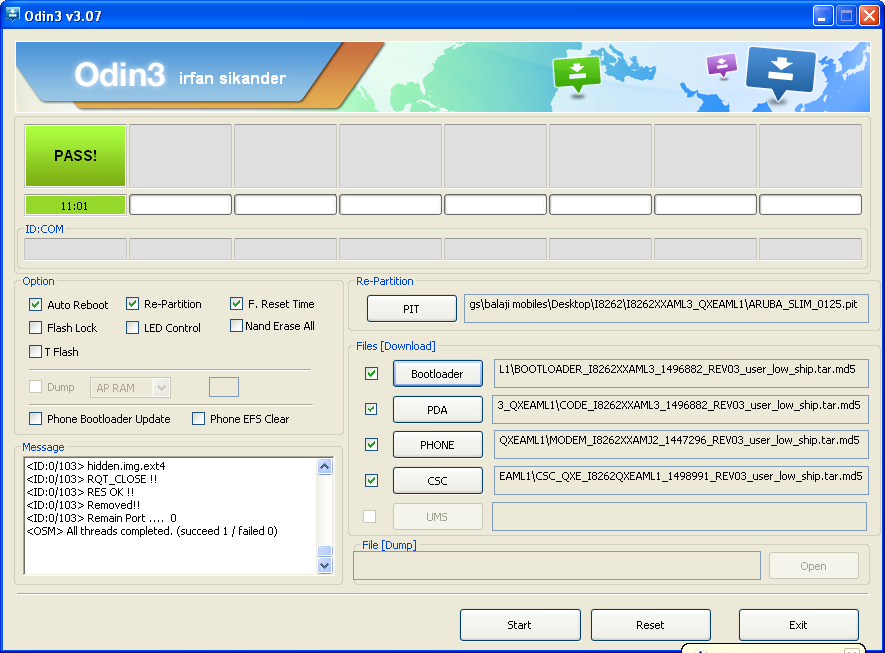
file version- I8262XXAML3_QXEAML1
flash file download from z3x support area
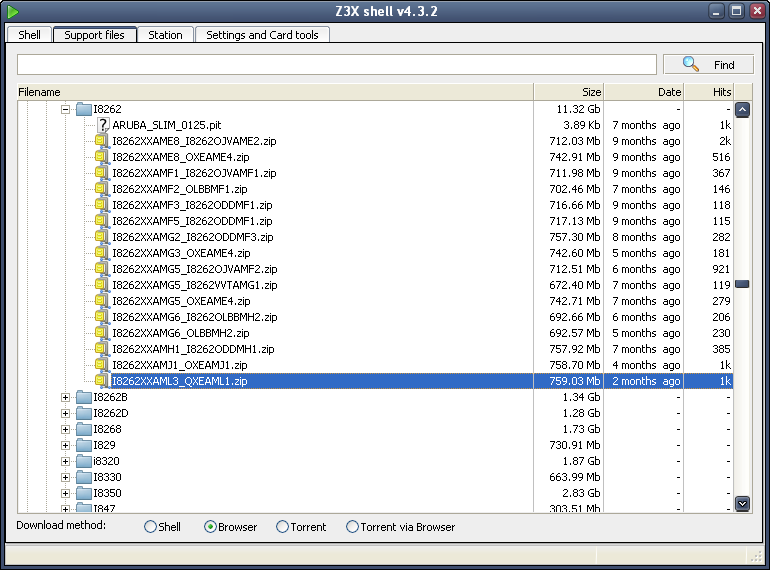
Pit file download from here#
I8262 Pit file - Download - 4shared - Cheerala Srinivas
flasher Download from here#
odin 3.07 - Download - 4shared - irfan sikander
Home Button + Volume Down + Power button together until you see a
construction Android robot on your screen. Press Volume Up button for
confirming to enter download mode
2.Now Run Odin 3.07.exe On Your Computer
Click the PIT Button, and select the file with .pit extension.
Click on PDA button, and select the file with CODE in its name
Click the Phone Button, and select file with *modem* in its name
Click the CSC Button, and select file with *csc* as its name
now click on start
file version- I8262XXAML3_QXEAML1
flash file download from z3x support area
Pit file download from here#
I8262 Pit file - Download - 4shared - Cheerala Srinivas
flasher Download from here#
odin 3.07 - Download - 4shared - irfan sikander


0 comments:
Post a Comment